
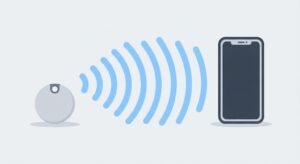
OTAG Does Not Have Its Own GPS
The tracker itself doesn’t calculate a GPS position. Instead, it broadcasts a Bluetooth identifier. A participating phone or device passing nearby detects that signal, and since that device already knows its own location, the finding network associates the detection with the place where the phone saw the tag.
No SIM and No Mobile Data Inside the Tag
There’s no cellular modem or data subscription built into an OTAG smart tracker. The internet connection used to relay a detection belongs to the nearby participating phone, not to OTAG itself — which is exactly why it needs no monthly data package, but also why it isn’t independently online all the time.
No Wi-Fi Connection Inside OTAG Either
The tag never joins your home router and needs no Wi-Fi credentials. A nearby phone might use cellular data or Wi-Fi to send a location report, but that connectivity belongs to the phone. OTAG’s own local radio role is strictly Bluetooth Low Energy.
Step by Step: What Happens When an Item Is Lost
- OTAG is paired to a supported finding ecosystem.
- The tag periodically advertises a privacy-preserving Bluetooth identifier.
- A compatible participating device comes within Bluetooth range.
- That device detects the tag and contributes the location where it was seen.
- The encrypted report is processed by the relevant finding network.
- The owner opens Find My or Find Hub and sees the latest network-reported location.
- Once physically close, nearby ring/find functions help locate the exact item.
- Why Other People’s Phones Matter for Updates
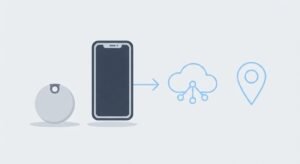
If no compatible device passes near the tag, there’s no new detection to report. Location freshness depends entirely on network density — in a busy airport or mall, updates can feel near-instant; in a remote area, the last reported location can sit unchanged for longer.
Don’t Call It “Continuous Real-Time GPS”
GOATGEN’s current product page uses “real-time location” language, and that framing sets the wrong expectation. For a crowdsourced Bluetooth tracker, “last detected location” is the technically accurate description — the tag has neither onboard GPS nor its own mobile-data link, so it cannot continuously transmit coordinates on its own.
Apple Find My and Google Find Hub: Dual Compatibility Needs Clear Setup
GOATGEN markets OTAG as compatible with both ecosystems. But Google’s Find Hub accessory specification states that switchable-protocol devices should run only one network protocol at a time, with a clear way to reset for the other. In practice, the setup guide should spell out which ecosystem the tag is currently provisioned to and how to switch it. For Apple’s side of the same architecture, Apple’s Find My support documentation covers how the crowdsourced detection network operates.
What OTAG Is Suitable For
Keys, wallets, bags and luggage
Items likely to pass through populated areas
Users who don’t want a SIM subscription
Finding something left behind and later detected by the network
Nearby ring/find functions once you’re close
What It Should Not Replace
A fleet-management GPS tracker
A SIM-based vehicle telematics unit
A child or pet tracker that must report its position continuously
A security system that guarantees second-by-second updates in remote areas
FutureByte Verdict
An OTAG smart tracker is best understood as a secure Bluetooth beacon connected to a much larger phone network. Once that architecture clicks, the apparent contradiction disappears: yes, the tag uses Bluetooth; yes, it can still be located from far away; the missing piece is simply the nearby participating device that detects it and relays where it was seen. GOATGEN would serve buyers better by making this architecture the actual selling point instead of leaning on GPS-like “live location” wording.
FAQ
Does an OTAG smart tracker contain GPS?
No — it should not be described as a conventional GPS tracker.
Does OTAG need a SIM or monthly data plan?
No SIM or data subscription is needed inside the tag for the crowdsourced Bluetooth model.
Does it only work inside my own phone’s Bluetooth range?
No. Your phone doesn’t need to be nearby — any other compatible device near the tag can detect it and relay the location.
Will the location always update instantly?
No. Updates depend on when a compatible device detects the tag and on the finding network’s reporting behavior.
Can Apple Find My and Google Find Hub run at the same time?
For switchable-protocol tags, Google’s current spec says only one protocol should run at a time — follow the product’s approved setup instructions to switch.
More Gadget Reviews on FutureByte
FutureByte covers smart trackers, wearables and business tech for Pakistan — practical, honest, no fluff.
